Ring after Vibration Widget1.97
Publisher Description
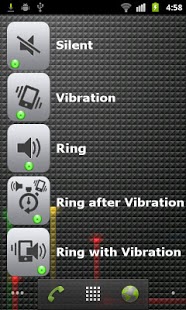
MyRingerWidget is a home screen widget that toggles ringer mode (audio profile) when you press it.
MyRingerWidget provides 5 different modes that Silent / Vibrate / Normal / Ring after Vibration / Ring with Vibration.
[This application is Android Widget. Please read following instruction before use.]
★★★ This is the only widget that makes you to use Ring after Vibration mode in your Smartphone. ★★★
[How to use]
1. Add "myRingerWidget" on the Home screen.
- Press long on empty space of Home screen, then select "Widgets" in "Add to Home screen" menu.
- If you select "myRingerWidget" in "Choose widget menu, widget icon will be appeared on Home screen.
2. Whenever you touch the widget, the ringer mode of your phone will be changed.
- You can remove the installed widget on home screen after pressing long the widget icon.
- Change order is Silent/Vibrate/Normal/Ring after Vibration/Ring with Vibration.
- If you select "Ring after Vibration" mode, your phone will vibrates for 10 secondes and then vibrates and rings on the incoming call.
(This widget verified on Samsung, HTC, LG phones with android version 1.6~2.3)
If you have any questions, don't hesitate to contact me.
Have fun!
Keyword : Ringer toggle widget Ring profile Profiles setting Silent Vibrate Ringer mode Silencer Switch Switcher Control Mute Vibrator Vibration Quick Toggle Sound Setting One Touch
About Ring after Vibration Widget
The company that develops Ring after Vibration Widget is sjandroid. The latest version released by its developer is 1.97. This app was rated by 1 users of our site and has an average rating of 3.0.
To install Ring after Vibration Widget on your Android device, just click the green Continue To App button above to start the installation process. The app is listed on our website since 2011-10-24 and was downloaded 71 times. We have already checked if the download link is safe, however for your own protection we recommend that you scan the downloaded app with your antivirus. Your antivirus may detect the Ring after Vibration Widget as malware as malware if the download link to com.ti.widget is broken.
How to install Ring after Vibration Widget on your Android device:
- Click on the Continue To App button on our website. This will redirect you to Google Play.
- Once the Ring after Vibration Widget is shown in the Google Play listing of your Android device, you can start its download and installation. Tap on the Install button located below the search bar and to the right of the app icon.
- A pop-up window with the permissions required by Ring after Vibration Widget will be shown. Click on Accept to continue the process.
- Ring after Vibration Widget will be downloaded onto your device, displaying a progress. Once the download completes, the installation will start and you'll get a notification after the installation is finished.
Program Details
System requirements
Download information
Pricing
Version History
version 1.97
posted on 2011-10-24
version 1.97
posted on 2011-10-24
Several fixes and updates
